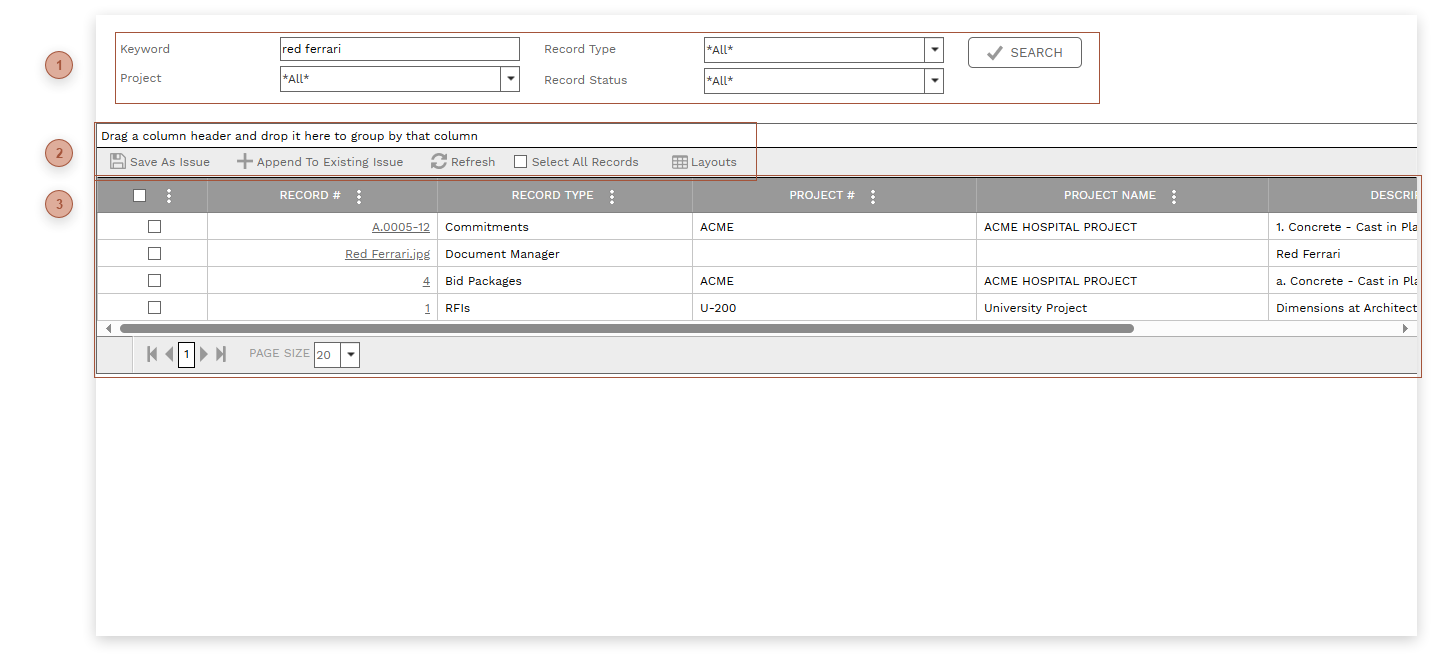
This page lets you search for keywords across PMWEB records. Search results can be used to create
Issues.
 FILTER FIELDS-
Keyword Field - Enter one or more keywords in this field -
Project Field - Select one project or "*All*" -
Record Type Field - Select one or more record types from the list or "*All*" -
Record Status Field - Select one or more statuses from the list or "*All*" -
Search Button - Click to execute the search
|
 TABLE TOOLBAR
-
Save As Issue Button - Click to create a new Issue with the search results that are checked. -
Append To Existing Issue Button - When you click this button you will be prompted to select an existing Issue to which you want to add the search results that are checked.
|
 RESULTS TABLESearch results appear here. All fields are read only.
|