Resources Tab
Use this tab to track resources - labor and equipment - used on the work order. Lines can be added to this tab by:
-
Using the Add button
-
Using the Add Resources Button
-
Using the Update From Dispatch Boards button to manually update from Dispatch Board records
-
Automatically updating from Dispatch Board records (when "Update Work Order resources from Dispatch Boards" is enabled in Portfolio/Setup/Settings/General Settings Locations Tab).
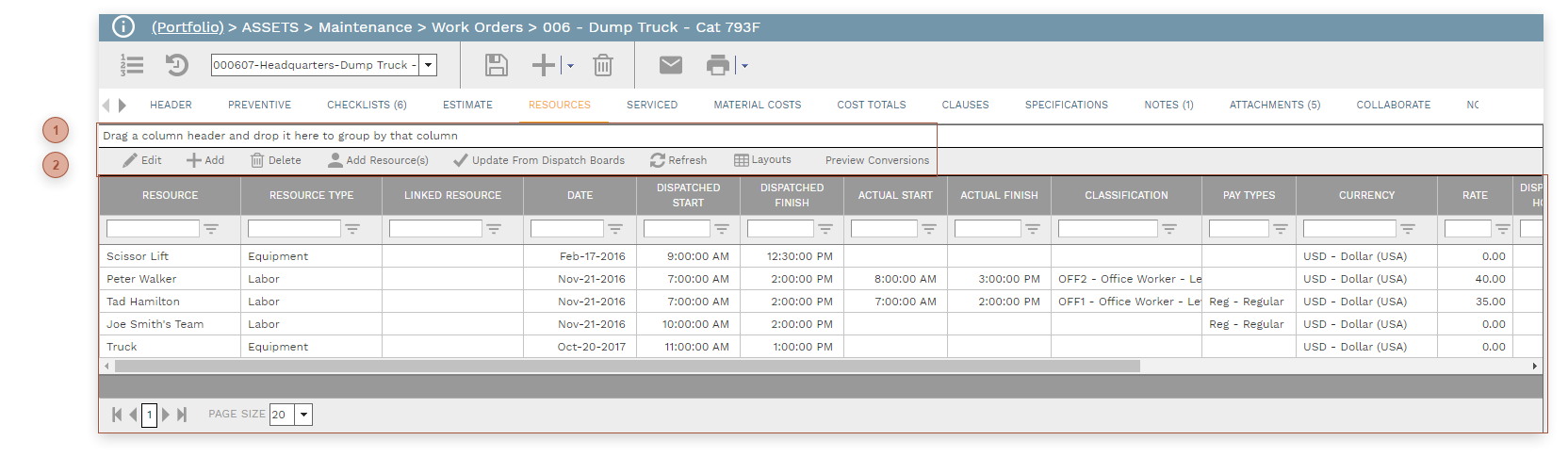
 Work Orders Resources Tab Toolbar Update From Dispatch Boards Button - Click this button to update Dispatch Board appointments linked to this work order. New Dispatch Board appointments will be added as lines in this tab and, for existing appointments, Dispatched Start and Dispatched Finish fields will be updated. Note: It is not necessary to click this button if "Update Work Order resources from Dispatch Boards" is enabled in Portfolio/Setup/Settings/General Settings Locations Tab.
|
 Work Orders Resources Tab Table
|