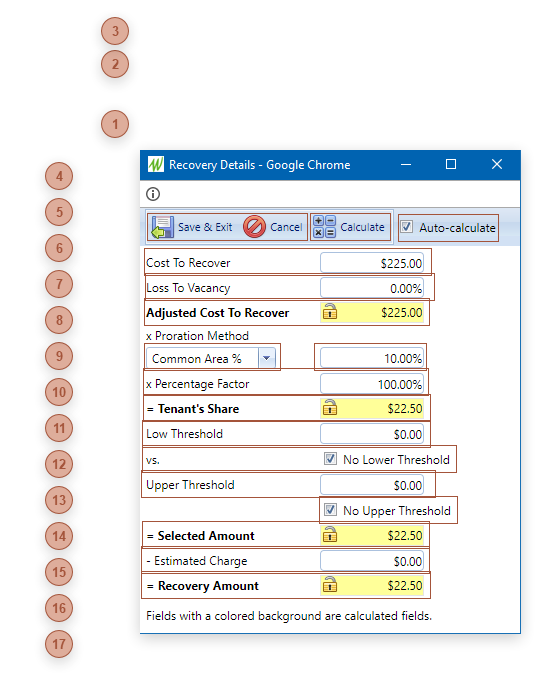
Use this dialog to calculate the Recovery Amount field in the Recoveries sub-table . Fields with colored backgrounds are recalculated each time the Calculate button is clicked or any field is edited (if "Auto-calculate" is selected) unless you lock them by clicking the Lock icon. See Lease Charges Details Dialog for more information about calculating recoveries.
 Dialog Toolbar |
 Calculate ButtonClick this button to recalculate the fields with colored backgrounds. Locked fields will not change.
|
 Auto-calculate CheckboxIf this box is checked, each time any field is edited the fields with colored backgrounds will be recalculated. Locked fields will not change.
|
 Cost To Recover FieldThis field defaults to Total Cost from the Recoveries sub-table but may be edited.
|
 Loss To Vacancy FieldThe default is 0.
|
 Adjusted Cost To Recover FieldThis is a calculated field:
Cost To Recover minus (Cost To Recover times Loss To Vacancy)
To override the calculation, click the icon to unlock the field, enter a new value, and then click the icon again to relock.
|
 Proration Method FieldThis field defaults to the Proration Method selected for the lease (see Leases Charges Tab and Lease Charges Details Dialog) but may be edited. Each time a selection is made in this field the percentage field to the right is automatically recalculated as follows:
-
# of Leases - 100 divided by the count of active leases at the location
-
# of Units - 100 divided by the number of active suites at the location
-
Common Area % - From the lease
-
Fixed % - The default is 100
-
Rentable Area % - The Rentable Area of the lease divided by the sum of Rentable Area from all active leases at the location times 100
-
Usable Area % - The Usable Area of the lease divided by the sum of Usable Area from all active leases at the location times 100
|
 Proration Percentage FieldThis field defaults from the selected Proration Method but may be edited
|
 Percentage Factor Field |
 Tenant's Share FieldThis is a calculated field:
Adjusted Cost To Recover times Proration Method times Percentage Factor
To override the calculation, click the icon to unlock the field, enter a new value, and then click the icon again to relock.
|
 Low Threshold Field |
 No Lower Threshold CheckboxIf checked, the entry in the Low Threshold field is ignored and not used in calculations.
|
 Upper Threshold Field |
 No Upper Threshold CheckboxIf checked, the entry in the Upper Threshold field is ignored and not used in calculations.
|
 Selected Amount FieldThis is a calculated field. If Tenant's Share is:
-
between Low Threshold and Upper Threshold - this defaults to Tenant's Share -
below Low Threshold - this defaults to Low Threshold -
above Upper Threshold - this defaults to Upper Threshold
To override the calculation, click the icon to unlock the field, enter a new value, and then click the icon again to relock.
|
 Estimated Charge FieldIf Include Estimated Charges in Calculations is checked in the header and if the Est. field is checked for the charge in the Leases Charges Tab this defaults to the Amount from the lease charge. If not, this defaults to 0. |
 Recovery Amount FieldThis is a calculated field:
Selected Amount minus Estimated Charge
To override the calculation, click the icon to unlock the field, enter a new value, and then click the icon again to relock. The value in this field is what is copied into the Recovery Amount field in the Recoveriessub-table.
|
|