Log Tab
Use this tab to log any sort of reading about the equipment record. Data from the Reading fields can be used to monitor predictive maintenance status.
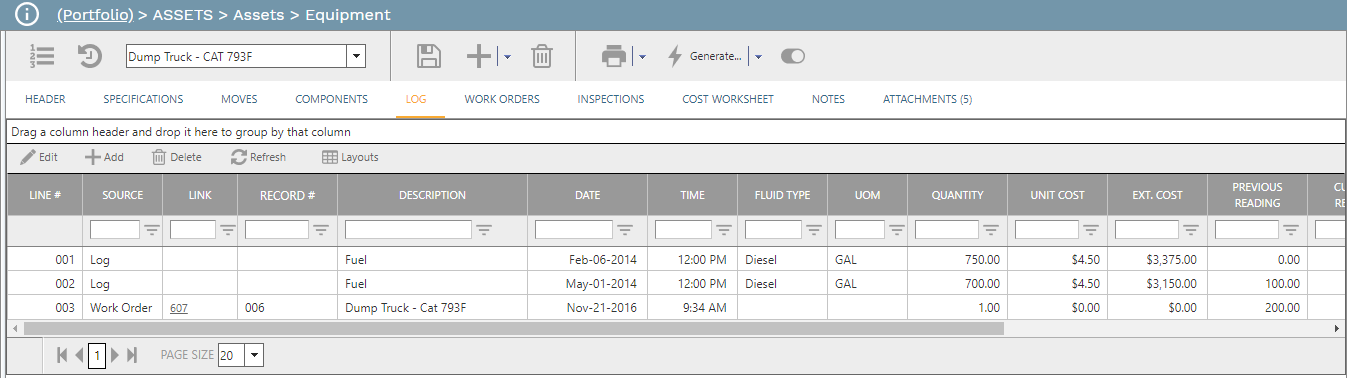
-
Line # Field - Line # Field
-
Source Field - System list. If the record is created within this tab this field is locked at "Log". If the record was created from a Work Orders record, this field is locked at "Work Order".
-
Link Field - Read only. If the record was created from a Work Orders record, this field displays the ID of the record. Click the hyperlink to navigate to the Work Order.
-
Record # Field - A text field
-
Description Field - Description Field
-
Date Field - Date Field
-
Time Field - Time Field
-
Fluid Type Field - Fluid Type
-
UOM Field - UOM Field
-
Quantity Field - Quantity Field
-
Unit Cost Field - Unit Cost Field
-
Ext. Cost Field - Ext. Cost Field
-
Previous Reading Field - Read only. The Current Reading from the last log entry.
-
Current Reading Field - Enter the current reading in the units of measure selected in the header of the record.
-
Usage Field - Read only. Current Reading minus Previous Reading.
-
Notes Field - Notes (Memo) Field