
Linear Definition Section
Use this section to enter descriptive information about the linear asset and/or click the Linear Asset Button to open the Google Linear Asset Dialog.
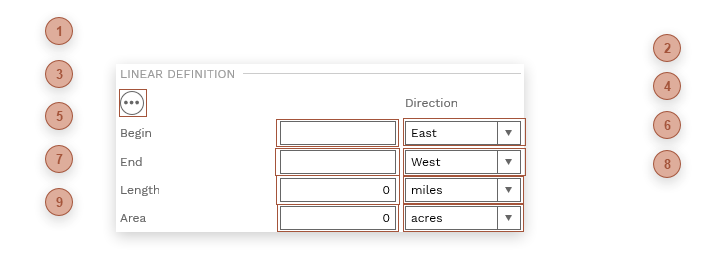
 Begin Label Field A text field. Enter a label for the beginning point of the linear asset or, if you use the Google Linear Asset Dialog to define the asset and have the "Update Linear Definition" selected when you save, this field is automatically calculated and filled for you.
|
 Begin Direction Field Direction Field. Pick a direction that describes the beginning point of the linear asset.
|
 End Label Field A text field. Enter a label for the ending point of the linear asset or, if you use the Google Linear Asset Dialog to define the asset and have the "Update Linear Definition" selected when you save, this field is automatically calculated and filled for you.
|
 End Direction Field Direction Field. Pick a direction that describes the ending point of the linear asset.
|
 Approx. Length Field Enter an approximate length of the linear asset or, if you use the Google Linear Asset Dialog to define the asset and have the "Update Linear Definition" selected when you save, this field is automatically calculated and filled for you.
|
 Length UOM Field A system list. The selections are "meters", "lnft", and "miles". Select a unit of measure for the Approx. Length field or, if you use the Google Linear Asset Dialog to define the asset and have the "Update Linear Definition" selected when you save, this field is automatically calculated and filled for you.
|
 Area Field Enter an approximate area of the linear asset or, if you use the Google Linear Asset Dialog to define the asset and have the "Update Linear Definition" selected when you save, this field is automatically calculated and filled for you.
|
 Area UOM Field A system list. The selections are "m2", "sqft", "hectares", and "acres". Select a unit of measure for the Approx. Length field or, if you use the Google Linear Asset Dialog to define the asset and have the "Update Linear Definition" selected when you save, this field is automatically calculated and filled for you.
|
 Linear Asset Button Click this button to open the Google Linear Asset Dialog.
|