Ledger Tab
This tab displays all of the currency based transactions related to the lease. Transactions can be added to the tab in several ways:
-
By using the Add button in the toolbar and directly editing the ledger line
-
By posting charges using the Lease Administrator
-
By creating Tenant Invoices
-
By creating Payments
Only transactions created by using the Add button can be edited here. All other transactions are read only.
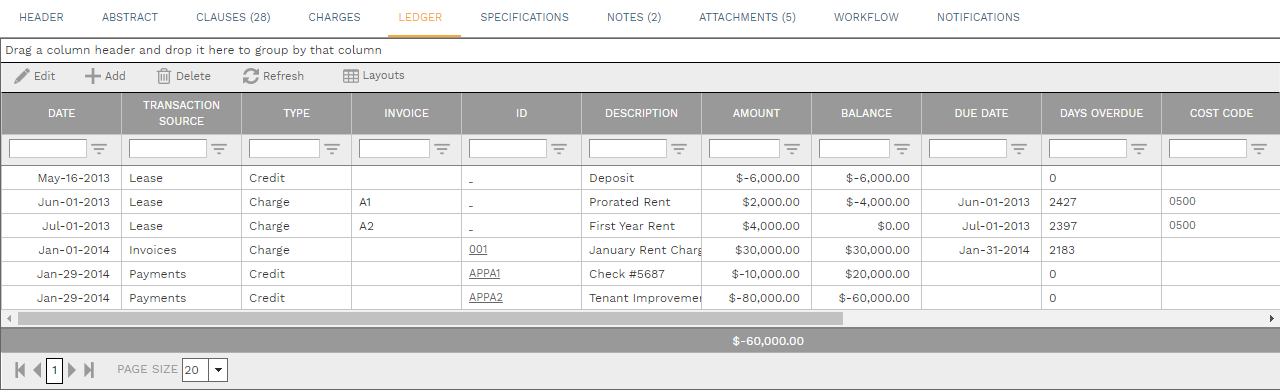
-
Transaction Source Field - Read only. A system list. The list includes:
Lease - A transaction created in the Ledger tab using the Add button
Invoices - A transaction created from the Lease Administrator or Tenant Invoices
Payments - A transaction created from Payments
-
Type Field - Read only. A system list. The list includes:
Charge - A transaction with a zero or positive Amount
Credit - A transaction with a negative Amount
-
Invoice Field - A text field
-
ID Field - Read only. If the transaction was not created directly in the Ledger tab a hyperlink to the linked record appears in this field.
-
Amount Field - A currency field
-
Balance Field - Read only. This is a running balance for all of the transactions displayed in the Ledger tab.
-
Days Overdue Field - Read only
-
Cost Code Field. The dropdown list displays the cost codes for the operating project for the location selected in the header of the lease.
-
Period Field. The dropdown list displays the cost periods for the operating project for the location selected in the header of the lease.
-
Workflow Status Field - Read only. If the transaction is an invoice or payment the status of the linked record is displayed here.
-
System ID Field - Read only. A sequential number assigned by PMWEB.
-
Batch ID Field - Read only. If the line was created by Lease Administrator, the batch ID appears in this field.