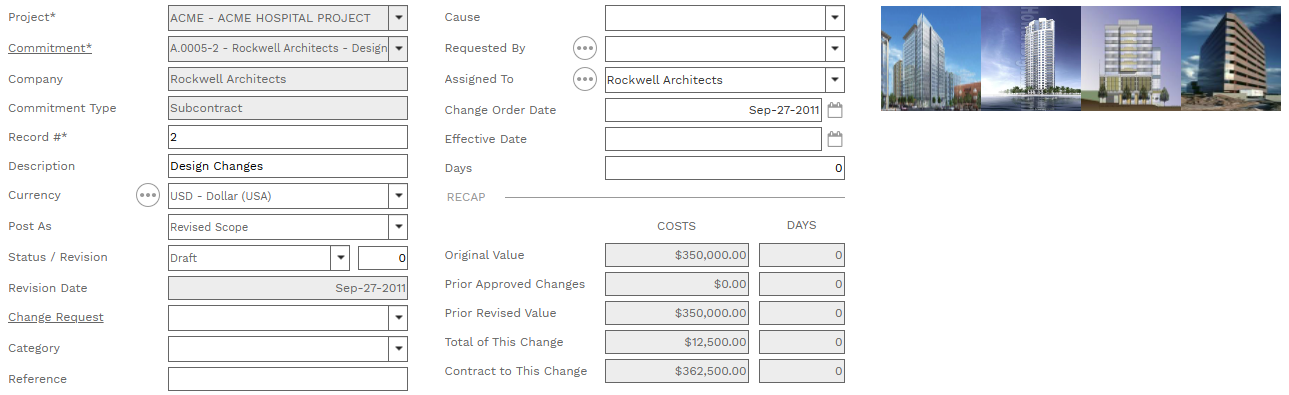
Commitment change orders amend Commitments and, therefore, committed costs on a project. Line items can be created in the Commitment COs page or they can be linked to Change Events. Approved commitment change orders can be linked to Progress Invoices.
 HEADER TOOLBAR
|
 RECORD TABS
|
 HEADER-
-
-
Company Field - Read only. The company linked to the commitment -
Commitment Type Field - Read only. The tpye linked to the commitment -
Record # Field - Required. An alphanumeric ID for the record.
-
-
-
Post As Field - This is a system list. The choices are:
Original Scope
Revised Scope (the default)
-
-
Date Field - Read only. The date the record was created.
-
Change Request Field - This dropdown list displays Online Change Requests linked to the selected commitment. If you generate the commitment change from the online change request this field is pre-filled. Click the field label to navigate to the record.
-
-
-
-
-
Change Order Date and Effective Date Fields - Date Field
-
Days Field - A positive or negative number field
-
Original Commitment Amount Fields - Read only. The grand total of Total Cost and the Days from the selected commitment.
-
Prior Approved Changes Fields - Read only. The grand total of the Total Cost field and the sum of the Days field on all other commitment COs for the selected commitment with a status of "Approved". -
Prior Revised Contract Fields - Read only. Original Commitment Amount plus Prior Approved Changes. -
Total of This Change Fields - Read only. The grand total of Total Cost and Days from this commitment change order. -
Contract to This Change Fields - Read only. Prior Revised Contract plus Total of This Change. -
|
 DETAILS TABLE TOOLBAR
|
 DETAILS TABLE
-
-
-
-
-
-
-
-
-
Unit Cost Requested Field - Use this field to differentiate between what was requested and what was approved.
-
Amount Requested Field - Use this field to differentiate between what was requested and what was approved.
-
-
-
-
-
-
-
-
-
-
-
-
-
-
|
|