User Guide PMWEB 2025
×

Collaborate Tab

 
The Collaborate Tab is used instead of the Workflow Tab in a record to ask for, gather, and document, users' input on a record.
 
Collaborate Tab
1

Take Action Button

1. Take Action Button
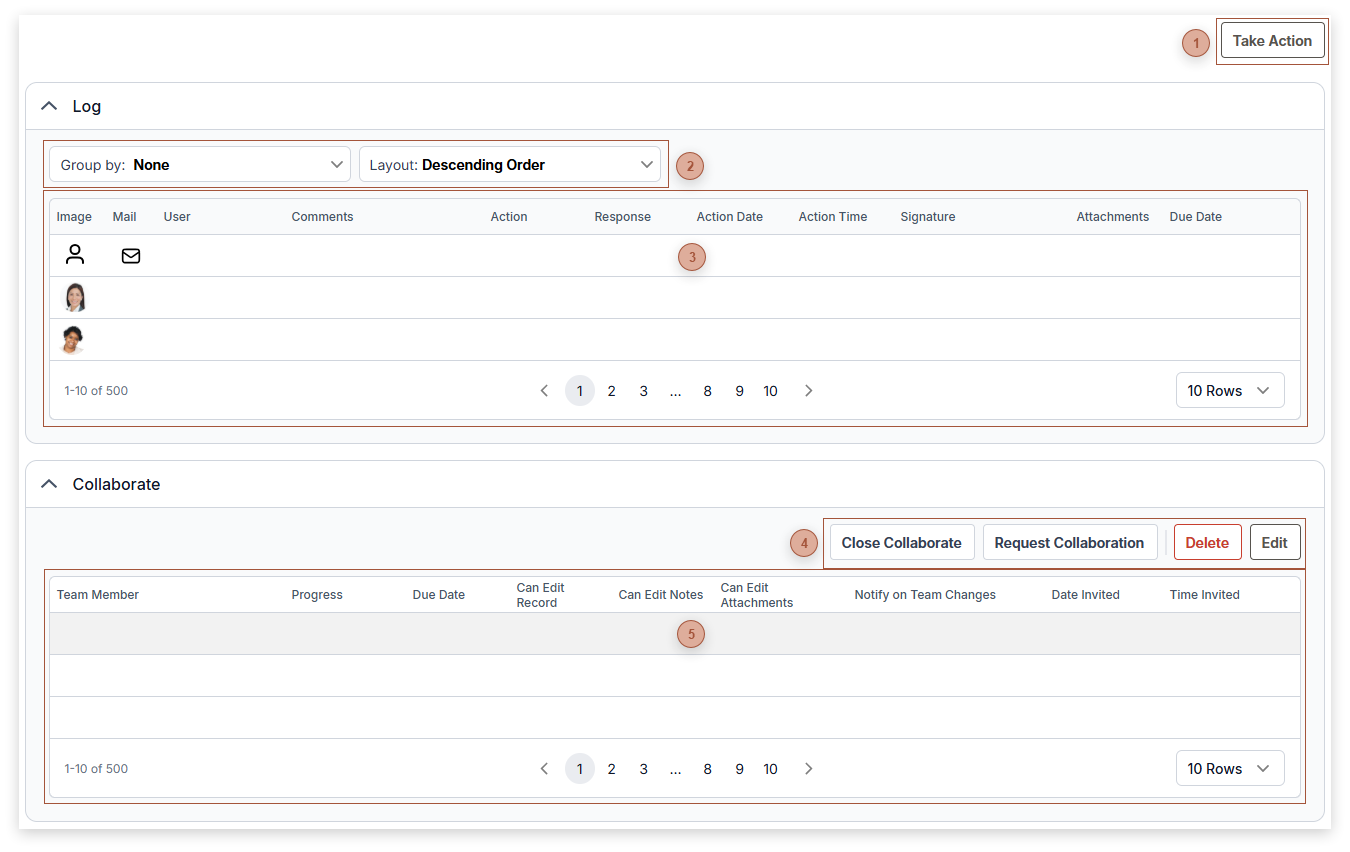
 If you are an active collaborator on the record, this button appears. Click this button to open the Collaborate Action Dialog.
 
3

Log Table

3. Log Table
This read-only table displays all of the collaborate actions taken on the record. You can click the mail icon to open the Resend Message Dialog.
 
4

Table Toolbar

4. Table Toolbar
 
5

COLLABORATE TABLE

5. COLLABORATE TABLE
This table is used to view and manage the members of a collaboration team.
  • Team Member Field - Read only. The ID and name of the user.
  • Progress Field - Read only. Possible values are:
Invited - the user has been invited but has not yet commented or completed their review
Comment - the user has logged at least one comment
Review Complete - the user has logged their review complete action. They may also have logged comments.