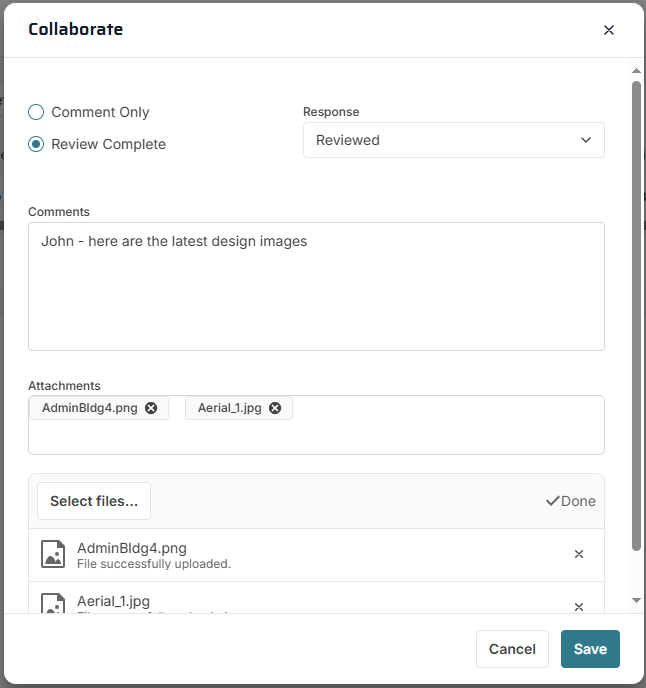
Collaborate Action Dialog
Use this dialog to take an action: make a comment, select a review complete action, and add attachments. Enter information in each section and then click the Save button for the action to take effect.
Comment Radio Button - If you select this radio button and then click the Save button:
-
A line will be added to the Collaborate log, including comments you entered and attachments you added
-
If configured, email messages will be sent to selected people
-
Your team member progress will be marked as "Comment"
-
The record will still appear in your collaborate inbox and you will be able to take further collaboration actions
Review Complete Radio Button - If you select this radio button and then click the Save button:
-
A line will be added to the Collaborate log, including comments you entered and attachments you added
-
If configured, email messages will be sent to selected people
-
Your team member progress will be marked as "Review Complete"
-
The record will disappear from your collaborate inbox and you will not be able to take further collaboration actions, unless you are issued a new invitation to collaborate on the same record.
Response Field - This field is enabled if you select the Review Complete radio button. The selection here will appear in the Response field in the log.
Comments Field - Type comments about your action here. Comments will be logged and, if configured in Message Templates they will appear in the collaboration email message.