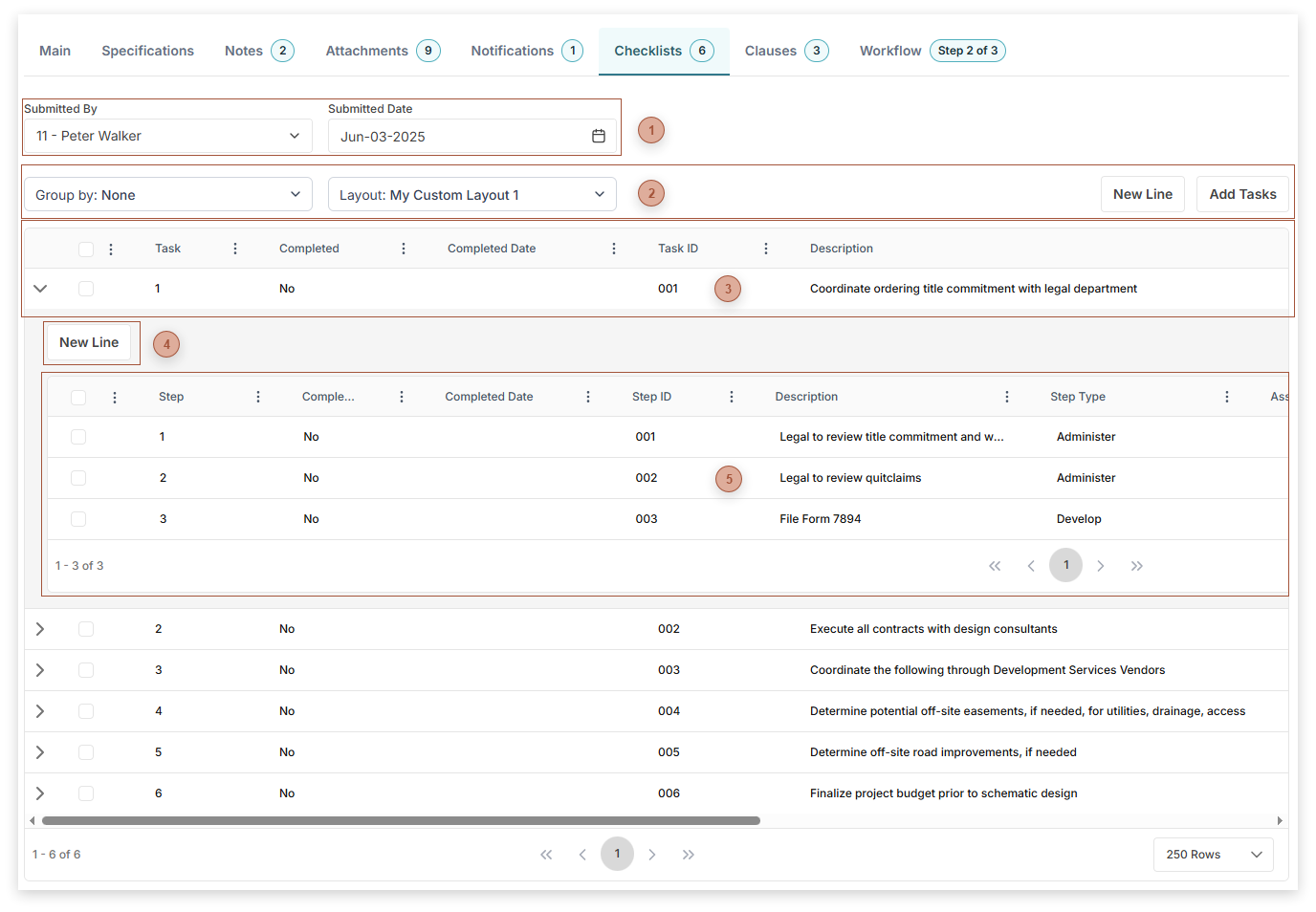
Use the Checklists Tab to record, assign, and monitor the completion of, an unlimited number of tasks which need to be completed for records. Each task can consist of an unlimited number of steps. Predefined checklists (see (Portfolio / Lists / Define Checklists) can be dragged into the Checklist Tab.
 Checklists Tab Header Fields |
 Tasks Table Toolbar |
 Tasks Table
-
Expand Button - Click this button to expand the sub-table -
-
Completed Field - Check this box to mark the task as completed. Checking this box sets the Completed Date field to today's date. Unchecking this box clears the Completed Date field.
-
-
Task ID Field - Defaults from the task but may be edited.
-
Description Field - Defaults from the task but may be edited.
-
-
-
-
-
Optional Checkbox - Check this box to mark the task as optional.
|
 Steps Sub-Table Toolbar |
 Steps Sub-Table
-
-
Completed Field - Check this box to mark the step as completed. Checking this box sets the Completed Date field to today's date. Unchecking this box clears the Completed Date field.
-
-
Step ID Field - Defaults from the step but may be edited.
-
-
-
-
-
-
Optional Checkbox - Check this box to mark the step as optional.
|
|